
AI Business Portrait Generator — a professional photo from a selfie
Updated 10 September 2026 · Twin AI Labs
An AI business portrait generator turns an ordinary selfie into a professional photo: you upload a phone shot, and the model returns a studio portrait in business attire on a neutral background in about a minute. Twin AI puts the strongest models in one window — Nano Banana Pro keeps your face without distortion, Seedream 5 Pro adds photorealism. Free to start, no per-tool subscriptions.

What is an AI business portrait generator
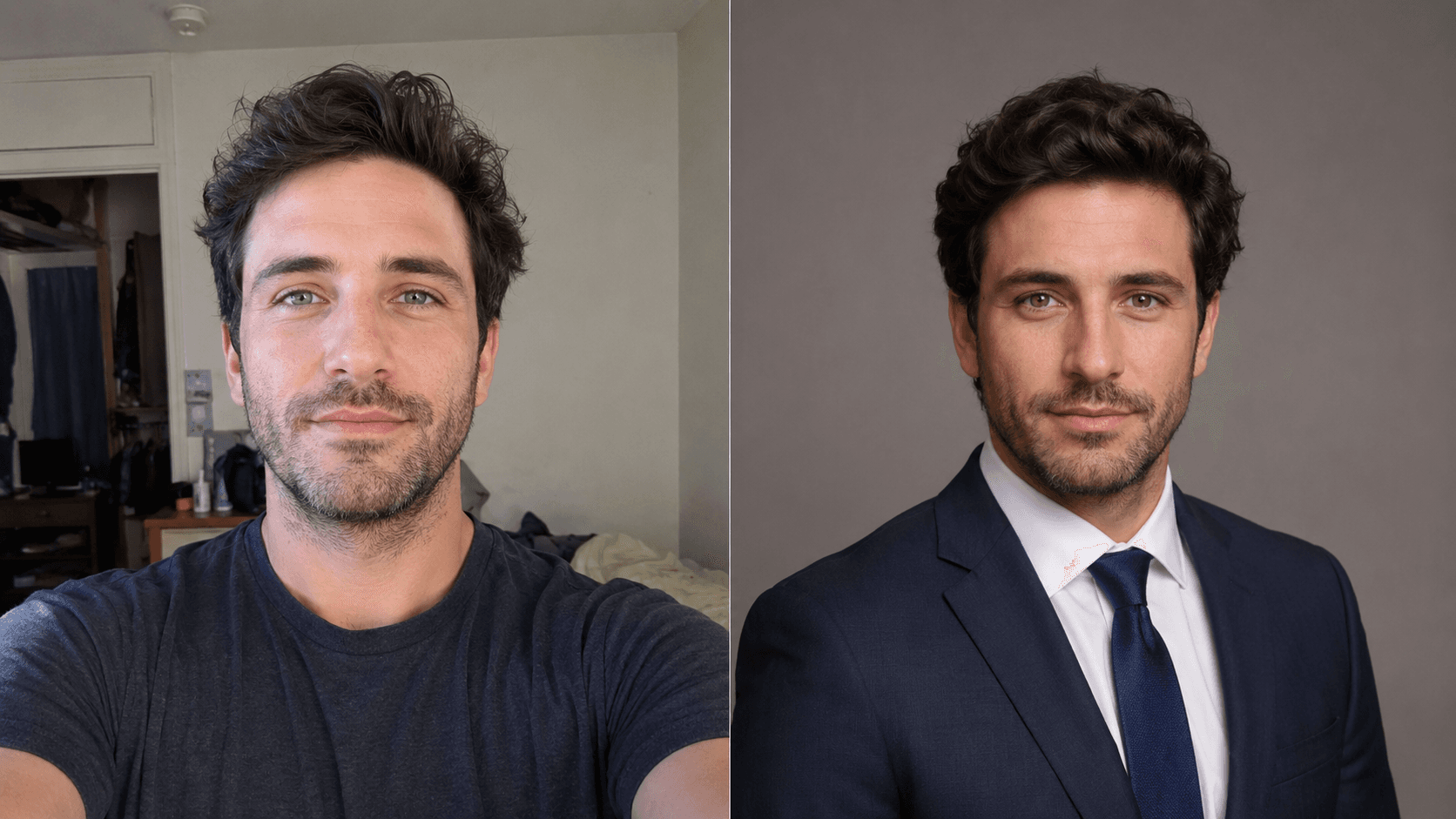
An AI business portrait generator turns an everyday selfie into a professional photo: you upload one or two shots, name the dress code and the background, and the model draws in the suit, sets studio lighting and removes the random room behind you. The result is a portrait you can put on a company site, a resume or a work-messenger profile.
In Twin AI this happens in one window: open “Create photo”, upload a face reference and write a prompt with the attire and the mood of the shot. No studio trip, no week-long retouch wait, no makeup fee — the first options appear in a minute, and you refine the best one with follow-up prompts.
How a business portrait differs from an avatar
An avatar allows any style — anime, a 3D figure, a creative look. A business portrait is stricter: a neutral or corporate background, a suit or a shirt, a calm pose, natural expression and light that does not distort your features. The goal is trust, not a wow effect.
That is why face fidelity matters most here: a client, an HR manager or a partner should recognize you at a live meeting. If you specifically need a LinkedIn card, we have a dedicated page on the LinkedIn headshot; this one is broader — company site, resume, speaker bio, press kit and business card.
Which Twin AI models fit a business photo best
Different business-portrait jobs are covered by different models — and that is the point of Twin AI: all of them in one window, no separate subscriptions.
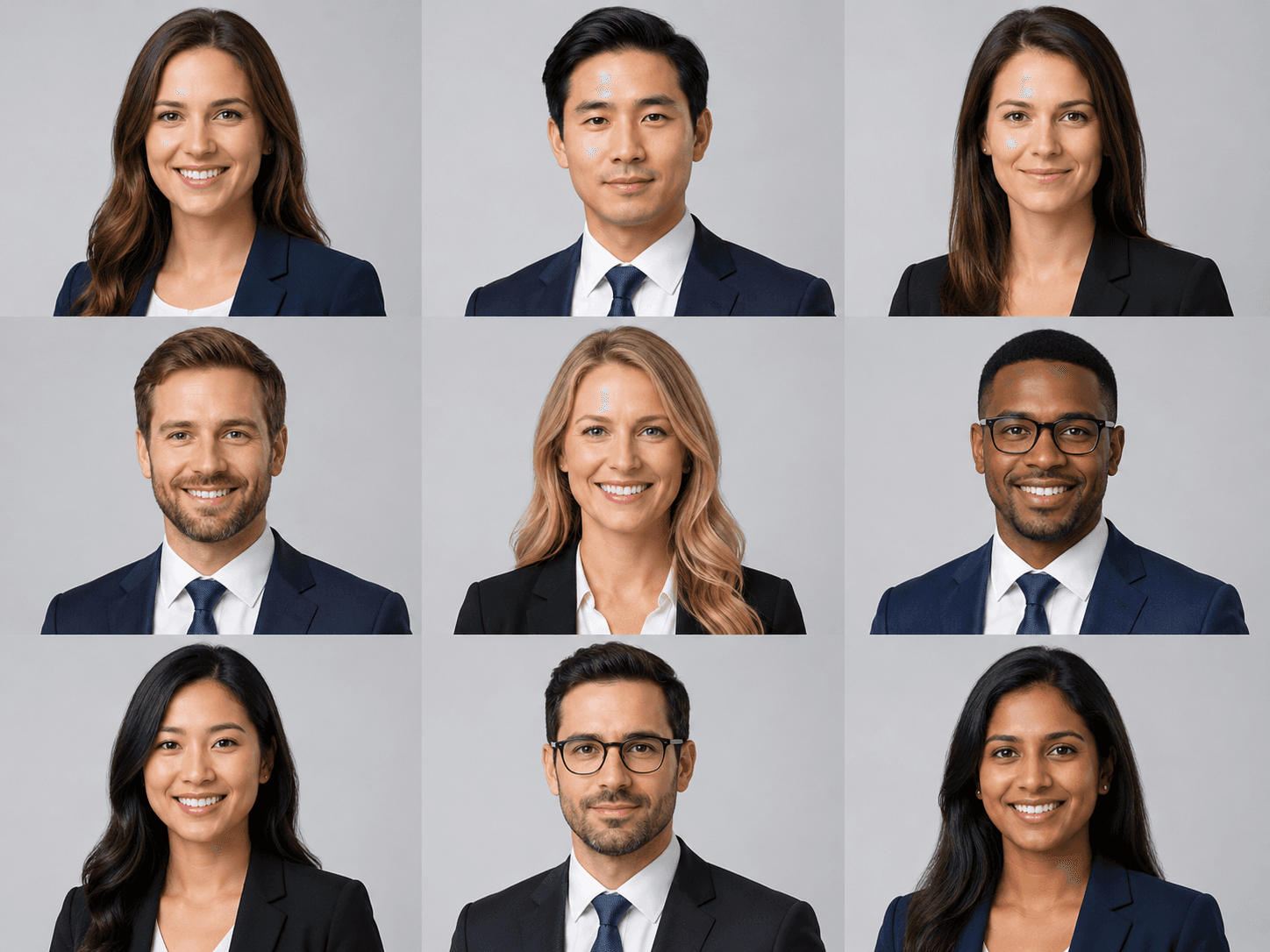
- Nano Banana Pro — image-edit with the best face retention: it changes the outfit and the background without redrawing you into a different person
- Seedream 5 Pro — photorealistic studio light and skin: the portrait looks shot on full-frame with a softbox
- GPT Image 2 — follows the brief precisely: a specific background, angle and dress code, output up to 4K for a badge or a press wall
- Ideogram 3 — when the photo needs clean lettering: a name and title on a badge or backdrop
How to make a business portrait in 5 steps
Step 1. Take 1–2 sharp selfies in even light, no harsh shadows or dark glasses — face large, eyes to camera.
Step 2. In Twin AI open “Create photo” → upload the shot as a reference → pick Nano Banana Pro.
Step 3. Write a prompt, for example: “business portrait, navy suit and white shirt, neutral gray background, soft studio light, natural expression, eyes to camera”.
Step 4. Get 4–6 options. Refine the best one: “make the background lighter”, “add a slight smile”, “switch the suit to gray”.
Step 5. For a badge or press-wall print, run the final through GPT Image 2 at 4K and download in high resolution.
Where to use a business portrait
One selfie covers several business needs at once — no need to organize a shoot for each.
- Team and About pages on the company site — one consistent portrait style for everyone
- Resume and job profiles — a clean photo lifts recruiter response
- Speaker card and conference program — a high-resolution portrait for print
- Press kit and media materials — a founder photo for articles and interviews
- Business card, badge and email signature
- Avatar on work messengers and professional platforms
How much an AI business portrait costs
One generation in Twin AI costs 200 credits (≈ $1.20 on Nano Banana Pro). A full selection — 6–10 shots with refinement — runs 1,200–2,000 credits ≈ $7–12. Free credits on sign-up cover your first portraits; the Start subscription from $15/mo gives 2,600 credits.
For comparison: a traditional headshot session runs $200–500+ for a set, plus hair and makeup and per-image retouching, and takes 1–2 weeks — and a ten-person team still has to gather in one place on one day. Dedicated AI headshot services charge $15–50 per set. Twin AI covers the same job with all the models in one window and no per-style lock-in.
What a business portrait costs: Twin AI vs HeadshotPro and Aragon
When people ask which AI headshot service to pick, the names that come up most are HeadshotPro, Aragon AI, BetterPic, StudioShot, Secta AI and Remini. Below are the prices of the two most-cited ones, taken from their official pages on 10 Sep 2026, and Twin AI’s price from its public models API and the /pricing page.
HeadshotPro sells one-time packages: Basic $29 for 30 headshots (about 2 hours turnaround), Professional $39 for 50 (30 minutes, one free redo), Executive $59 for 70 (15 minutes, 4K); teams pay from $19.50 per shoot, and every package carries a money-back guarantee “if it doesn’t look like you”. Aragon AI on the App Store is a subscription: Lite $14.99 a month or $132.99 a year, Pro $29.99 a month or $264.99 a year; it promises 100+ portraits from 6 uploaded photos and is rated 3.9 out of 5 on 47 ratings. In Twin AI one generation in Nano Banana Pro, Seedream 5 Pro or GPT Image 2 costs 200 credits per the public models API; the Start plan is $15 a month for 2,600 credits, plus free credits on sign-up.
Where: HeadshotPro — headshotpro.com; Aragon — the App Store app; Twin AI — the browser at twinailabs.com, the App Store app (apps.apple.com/us/app/twin-ai-photo-video-generator/id6747599634 — rated 4.6 out of 5 on 153 ratings, coin packs from $6.99). Bottom line: HeadshotPro is cheaper for a ready set of dozens of shots, Aragon is a subscription, Twin AI is pay-per-generation with a free-form prompt and no VPN.
| Service | Price | What you get | Where |
|---|---|---|---|
| HeadshotPro Basic | $29 one-time | 30 headshots, about 2 hours | headshotpro.com |
| HeadshotPro Professional | $39 one-time | 50 headshots, 30 minutes, 1 redo | headshotpro.com |
| HeadshotPro Executive | $59 one-time | 70 headshots, 15 minutes, 4K | headshotpro.com |
| Aragon AI Lite | $14.99 per month / $132.99 per year | 100+ portraits from 6 photos | App Store |
| Aragon AI Pro | $29.99 per month / $264.99 per year | 100+ portraits from 6 photos | App Store |
| Twin AI | 200 credits per generation; Start $15 for 2,600 credits | your own prompt, Nano Banana Pro / Seedream 5 Pro / GPT Image 2 | twinailabs.com, App Store, Google Play |
How to get one consistent portrait for a whole team
A team-page portrait works when everyone shares one visual style. A few rules save credits and keep shots in a single set:
- Lock the background and light in one prompt phrasing and reuse it for every employee
- Keep one dress code: say “dark suit, white shirt, neutral gray background” across the team
- Same angle and crop — chest-up, eyes to camera — so portraits line up in an even grid
- Generate 4–6 options per person and pick the closest likeness — face fidelity beats a “prettier” shot
- Check the portrait at thumbnail size: team pages often show a circle of 80–120 pixels
Sources
- HeadshotPro — pricing pageheadshotpro.com
- HeadshotPro — home pageheadshotpro.com
- App Store — Aragon.AI: Headshot Generator appapps.apple.com
- App Store — Twin AI: Photo Video Generator appapps.apple.com
- Twin AI — pricing and creditstwinailabs.com
FAQ
Can people tell it is AI and not a studio shoot?
For typical uses — company site, resume, profile — a quality AI portrait is indistinguishable from a studio one. The model keeps your features and makes the light and background neutral. For premium image campaigns and covers you still want a photographer with art direction.
Can it dress me in a suit I do not own?
Yes — that is what Nano Banana Pro does: upload a casual selfie in a t-shirt and name the suit, shirt and tie in the prompt, and the model dresses you while keeping your face. You can change the dress code as many times as you like.
Will I get one consistent style for the whole team?
Yes. Lock one background, light, dress code, angle and crop in the prompt and reuse that phrasing for each employee — the portraits will line up in an even grid on the Team page.
How many photos do I need to upload?
One or two sharp, well-lit selfies are enough for Nano Banana Pro. More angles help the model keep your likeness, but a single clear front-facing shot already works.
Can I make a business portrait for free?
Yes. Free credits on sign-up are enough for your first portraits before paying. After that continue on the Start subscription from $15/mo (2,600 credits) or top up credits one-off.
Will this replace a photographer?
For a standard business photo — site, resume, badge, messenger — AI covers the job in minutes for cents. For staged image shoots with makeup and art direction a photographer is still needed, but most employees do not need that level for a team-page portrait.