
AI Interior Design — redesign a room from one photo
Updated 10 September 2026 · Twin AI Labs
An AI interior design tool redraws your room from a single photo: it keeps the real walls, windows and proportions while changing the finish, furniture and style in about 30 seconds. Twin AI puts several models in one window: Nano Banana Pro holds the room geometry, Seedream 5 Pro delivers a photorealistic render, GPT Image 2 follows the prompt precisely. No designer, no 3D editor, free to start.

What is an AI interior design tool
An AI interior design tool does a virtual remodel from a photo: you upload a shot of an empty or lived-in room, pick a style, and the AI returns a finished render with new finishes, furniture and lighting. The model does not build a project from scratch — it repaints your own room while keeping the layout and windows.
In Twin AI this happens in one window: open “Create photo”, upload a room photo as a reference, describe the style you want, and get several interior variants at once. No 3D editor to learn, no designer to hire for hundreds of dollars, no weeks of waiting for a concept.
Which Twin AI models fit interiors best
The key advantage of Twin AI is several models in one window — no separate subscription for each tool. For a room redesign the strongest picks are:
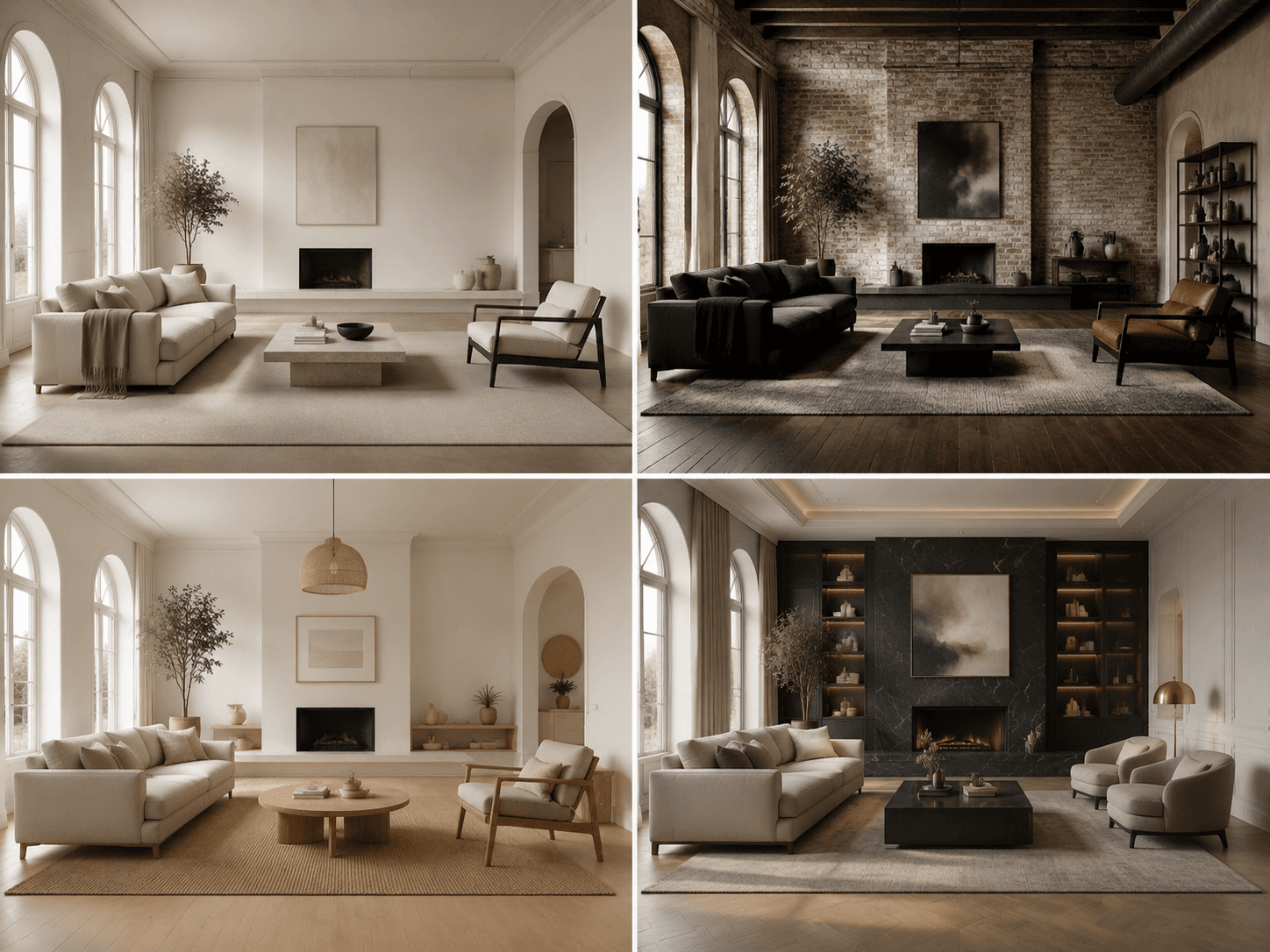
- Nano Banana Pro — the most accurate image-edit: keeps room geometry, windows and perspective, changing only finish, furniture and decor without melting walls
- Seedream 5 Pro — photorealism: warm light, realistic materials (wood, concrete, textile), a render that looks like a design magazine shot
- GPT Image 2 — follows the prompt precisely: a specific piece of furniture, wall color, style up to 4K for a large visualization
- Ideogram 3 — when you need a zone label or a caption right on the image
- Recraft V3 — vector floor plans and moodboards in one project style
Which styles you can generate
The AI runs through dozens of directions in minutes — cheaper than testing materials and colors on real walls. Popular styles on request:
- Scandinavian — light wood, white walls, soft textiles, plenty of daylight
- Minimalism — clean lines, a neutral palette, minimal decor
- Industrial loft — concrete, brick, metal, exposed utilities
- Modern classic — moldings, symmetry, muted tones
- Japandi, boho, mid-century, hi-tech — and any mix from your description
How to redesign a room in 30 seconds
Step 1. Photograph the room with your phone in daylight — a wide shot so the walls and windows are visible.
Step 2. In Twin AI open “Create photo” → upload the shot as a reference → pick Nano Banana Pro → write a prompt like “redesign this room in Scandinavian style, light wood, white walls, a soft sofa, keep the layout and windows”.
Step 3. Get 4–6 interior variants. Refine the best one with a follow-up prompt — change the wall color, furniture type and lighting without losing the room geometry.
Step 4. Need photorealism for a client pitch — run the frame through Seedream 5 Pro or GPT Image 2 at 4K.
Step 5. Download the finished render and show it to a designer, a contractor, or use it as a reference for the remodel.
Who it is for
A virtual redesign covers jobs across roles — from a homeowner to a realtor.
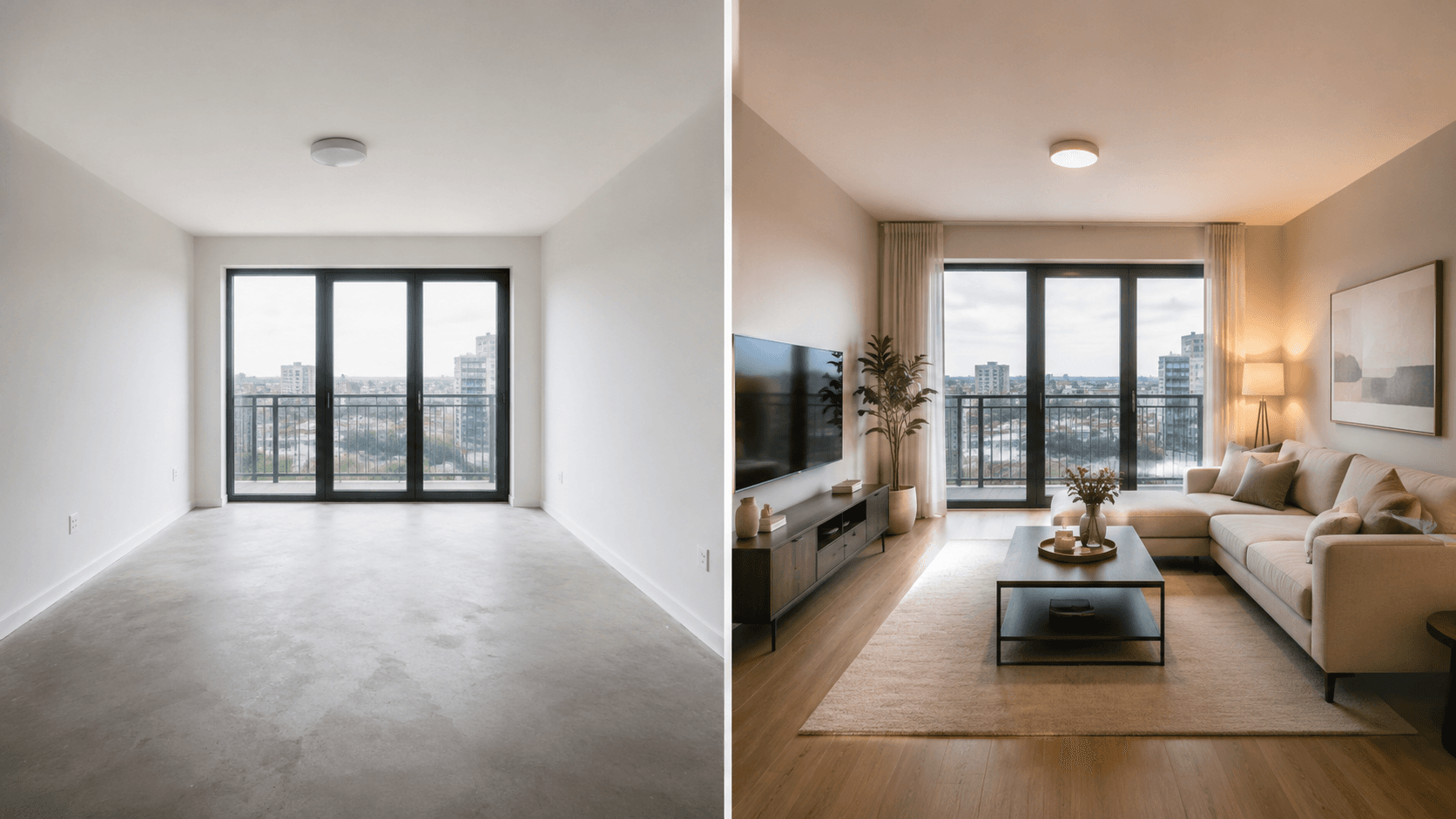
- Homeowners before a remodel — see the room in different styles before buying materials
- Realtors and home staging — virtually furnish an empty apartment so the listing sells faster
- Interior designers — show a client several concepts in a minute instead of slow manual rendering
- Landlords — refresh a room photo for a listing without an actual remodel
- Bloggers and furniture stores — interior content for different niches
How much AI interior design costs
One Nano Banana Pro generation = 200 credits ≈ $1.20 (prices updated 10 Sep 2026 from the models API). Even with extra styles and a photorealistic pass, one finished room variant costs 200–400 credits ≈ $1.20–2.40. Free credits on sign-up are enough to build a first render before paying. The Start subscription from $15/mo gives 2,600 credits — several interior variants.
For comparison, a studio design project starts at a few dollars per square foot, and a single manual 3D room render runs $30–100 and takes days. AI solves the “show me what it will look like” job in a minute and for about a dollar per frame, with no subscription lock-in.
How to get a realistic result
Render quality depends on the source photo and the prompt. A few rules help:
- Shoot the room in daylight as a wide shot — the AI reads the geometry better
- Add “keep the layout and windows” to the prompt so the model does not rebuild walls
- Name concrete materials and colors — “oak parquet”, “gray concrete”, not just “nice”
- Generate 4–6 variants and pick the best — cheaper than one “perfect” prompt
- For a final client image, run the frame through Seedream 5 Pro or GPT Image 2 at 4K
FAQ
Will the AI keep my room layout?
Yes, if you use Nano Banana Pro and add “keep the layout and windows” to the prompt. This model changes the finish, furniture and style while holding the room geometry and perspective. The sharper your wide-shot source photo, the more accurate the result.
Can I furnish an empty room to sell a property?
Yes — this is virtual home staging. Upload a photo of the empty room and ask the AI to add furniture, light and decor in the style you want. The finished frame can go into a listing so buyers see the room’s potential.
Which interior styles can the AI generate?
Scandinavian, minimalism, industrial loft, modern classic, Japandi, boho, hi-tech and any mix from your description. Just name the style in the prompt and the model runs through dozens of variants in minutes.
Will this replace an interior designer?
For a working project with drawings, measurements and a spec sheet — no, you still need a designer. But AI covers the “show me what it will look like” stage: concepts, style and color exploration, draft visualization. Many designers use the AI themselves to show clients options faster.
Can I do interior design for free?
Yes. Free credits on sign-up are enough to build a first room render and test styles before paying. After that you can continue on a subscription from $6/mo or top up credits one-off.
What photo do I need to upload?
A wide daylight shot of the room where the walls and windows are visible works best. It can be an empty room or a furnished one — the AI redraws the finish and furniture either way while keeping the structure.