
LoRA (Low-Rank Adaptation) — Definition, How It Works & Examples
Updated 29 July 2026 · Twin AI Labs
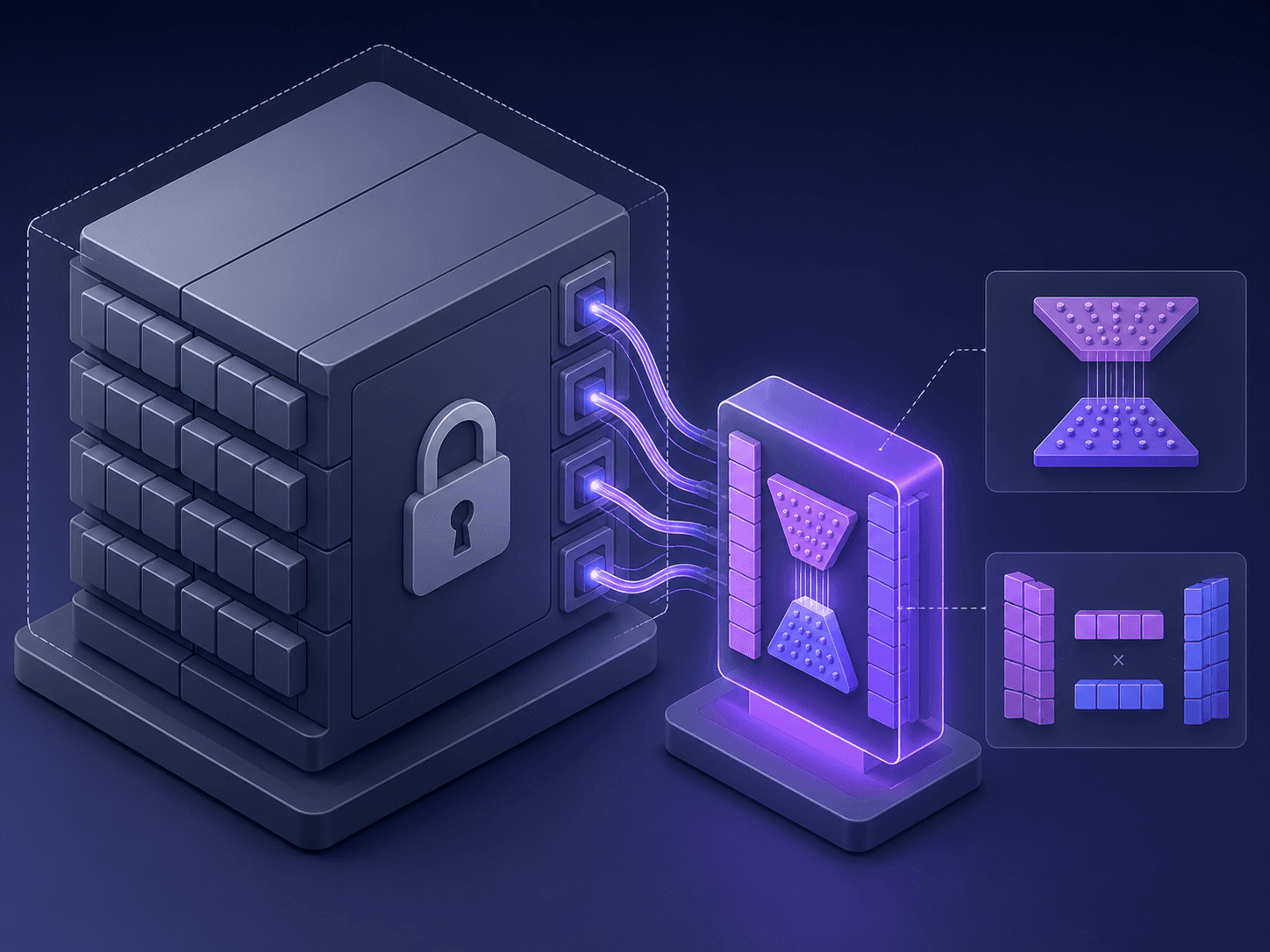
LoRA (Low-Rank Adaptation) is a fine-tuning technique that teaches a large AI image or language model a new concept — a face, style or object — by training a small set of extra low-rank weight matrices while the multi-billion-parameter base model stays frozen. The result is a tiny 10–200 MB adapter instead of a full multi-gigabyte model.

What does LoRA stand for?
LoRA stands for Low-Rank Adaptation. It is a parameter-efficient fine-tuning method introduced by Microsoft researchers in the 2021 paper "LoRA: Low-Rank Adaptation of Large Language Models". The core idea is simple: instead of updating all of a model's billions of parameters to teach it something new, you freeze the original weights and train two small matrices that capture the change. Those matrices are added back on top of the frozen model at generation time. The technique started in language models but is now the default way people customise image models like Stable Diffusion and FLUX.
How LoRA works
A neural layer holds a large weight matrix W. Full fine-tuning would rewrite every number in W. LoRA leaves W frozen and learns a low-rank update — two thin matrices A and B whose product BA has the same shape as W but far fewer independent values. The effective weight becomes W + BA. Because the rank of BA is small (often 4 to 64), you train a fraction of the parameters, use much less GPU memory, and finish in minutes instead of days. The base model's general knowledge is preserved; the LoRA only nudges it toward your concept.
See the original 2021 paper at arxiv.org/abs/2106.09685 and the Hugging Face PEFT docs at huggingface.co/docs/peft for implementation details.
Why LoRA matters: size, speed and stacking
The practical payoff is dramatic. A few concrete numbers show why LoRA took over the customisation workflow:
- File size: a full Stable Diffusion checkpoint is 2–7 GB, while a LoRA adapter is typically 10–200 MB — small enough to share and swap freely.
- Training time: a LoRA can learn a new face or art style in about 15–45 minutes from just 10–50 training images.
- Stacking: multiple LoRAs can be combined at generation time — for example one for a face plus one for a lighting style.
- Portability: the base model stays untouched, so a single model can host thousands of interchangeable LoRAs.
LoRA in Stable Diffusion, FLUX and image models
In the image world you meet LoRA constantly. Communities around /alternatives/stable-diffusion publish thousands of LoRAs for specific characters, outfits and painting styles. Newer models pushed the quality further — in 2026 FLUX.2 leads the market on LoRA training support, letting creators fine-tune photoreal concepts from only a handful of images (see /alternatives/flux-2-pro). A LoRA is model-specific: one trained on Stable Diffusion will not load on FLUX, because it is shaped to the exact layers of its base model.
How Twin AI uses LoRA
Twin AI puts LoRA to work without asking you to touch any of it. When you create an /use-cases/ai-photoshoot or an /use-cases/avatar, Twin trains a personal LoRA-style model of your face from a handful of selfies — the same low-rank fine-tuning idea, fully automated in the cloud. You never download a .safetensors file, rent a GPU, or pick a rank: you upload photos, choose a template in /photoshoots, and get consistent images of yourself in any scene. Twin runs several base models under the hood, so your personal model can be paired with different styles, and you can pay with a Russian card or SBP with no VPN. Start free in /create/photo.
FAQ
What does LoRA stand for?
LoRA stands for Low-Rank Adaptation. It is a fine-tuning technique that adapts a large AI model to a new concept by training small low-rank weight matrices while keeping the original model frozen.
How big is a LoRA file?
A LoRA adapter is usually 10–200 MB, compared with 2–7 GB for a full Stable Diffusion checkpoint. That small size is why LoRAs are easy to share, store and swap.
Do I need a LoRA to use Twin AI?
No. Twin AI trains and applies a personal LoRA-style model for you automatically when you make an AI photoshoot or avatar. You just upload a few photos — there are no files to manage. Try it in /create/photo.
Can you combine several LoRAs at once?
Yes. LoRAs are stackable: at generation time you can blend more than one — for example a LoRA for a specific face together with a LoRA for a particular art style or lighting.
What is the difference between LoRA and full fine-tuning?
Full fine-tuning updates every parameter of the model, needs large datasets and lots of GPU time, and produces a multi-gigabyte model. LoRA freezes the base model and trains only small low-rank matrices, so it is far faster, cheaper and produces a tiny adapter — with quality close to full fine-tuning for most style and subject tasks.