
ControlNet — Definition, How It Works & Control Types
Updated 8 August 2026 · Twin AI Labs
ControlNet is a neural network that adds structural control to an AI image model: you feed it a reference — an edge outline, a depth map, or a pose skeleton — and the image it generates follows that structure while the /glossary/prompt fills in style, colour and detail. It is how you keep a specific composition, pose or layout instead of leaving everything to chance.

What is ControlNet?
ControlNet is an add-on neural network that lets you steer the composition of an AI-generated image with a second input alongside the text. On its own a /glossary/diffusion model like /alternatives/stable-diffusion turns a /glossary/prompt into an image, but you have no reliable control over exact pose, framing or layout — a new /glossary/seed gives a new arrangement. ControlNet fixes that: you give it a control map (edges, a depth map, a human pose) and the model generates an image that keeps that structure while the prompt decides the look. It was introduced in 2023 by Lvmin Zhang, Anyi Rao and Maneesh Agrawala in the paper "Adding Conditional Control to Text-to-Image Diffusion Models" (arxiv.org/abs/2302.05543), which won the ICCV 2023 Marr Prize.
How ControlNet works
ControlNet makes a trainable copy of the encoder half of the diffusion model's U-Net and freezes the original. Your control map is fed into that copy, and its output is added back into the frozen network through "zero convolution" layers — connection layers whose weights start at zero, so at the beginning of training ControlNet has no effect and the base model is never damaged. As training proceeds those connections learn to nudge the denoising at every step toward images that match the control input. Because the original model stays frozen, a ControlNet is a small, swappable module: one for Canny edges, one for depth, one for pose, each trained separately and loaded on demand on top of the same base model.
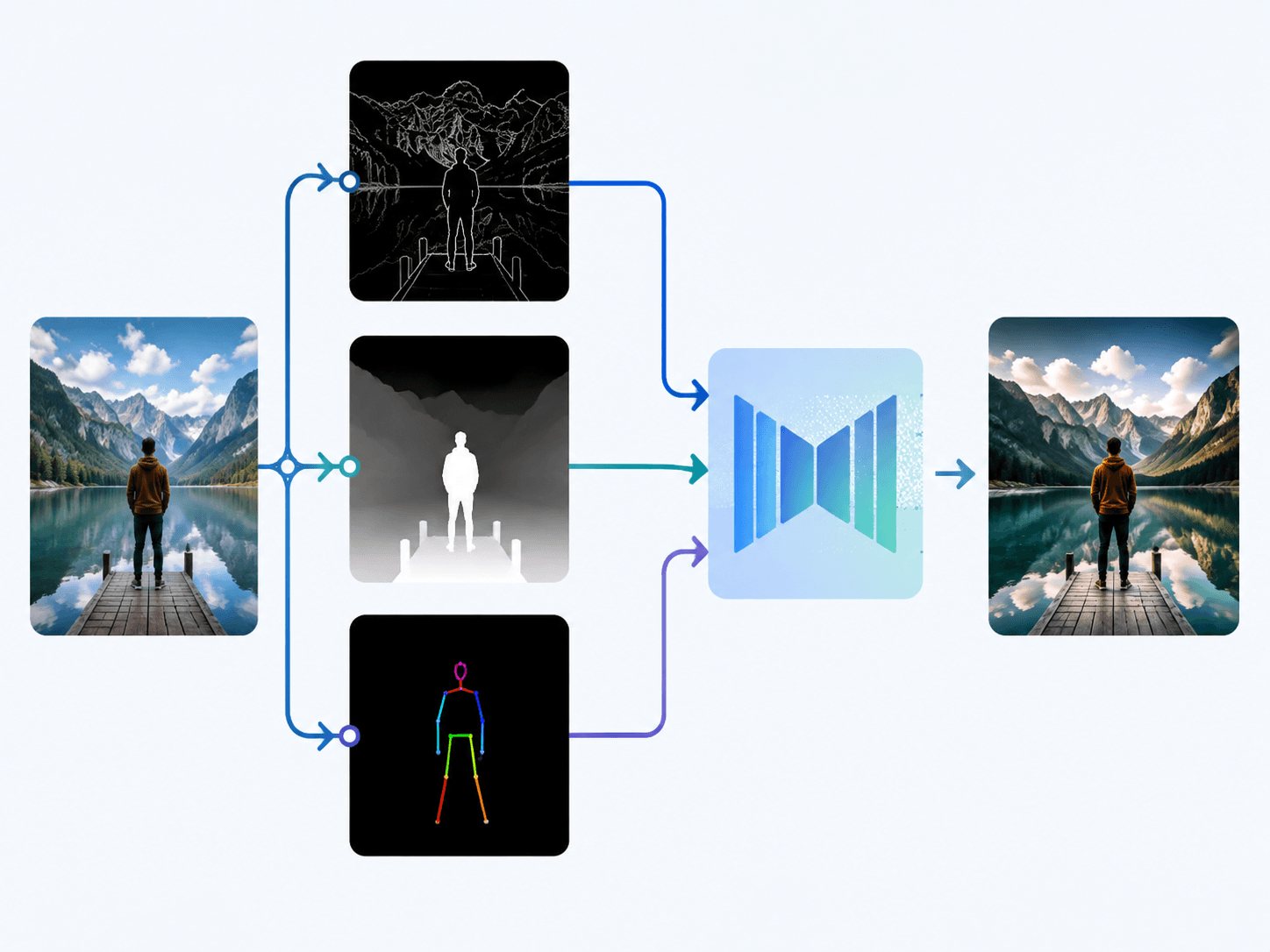
ControlNet control types
Each ControlNet is trained for one kind of control map, produced by a "preprocessor" that extracts structure from your reference image. The most used ones are:
- Canny edge — traces the hard outlines of the reference so the output keeps the same shapes; the most general-purpose control.
- Depth — a greyscale map where near is light and far is dark, preserving 3D layout and camera perspective.
- OpenPose — a stick-figure skeleton of head, torso and limbs, so a person is regenerated in the exact same pose.
- Scribble / sketch — turns a rough hand drawing into a finished image following your lines.
- Segmentation — a colour-coded map of regions (sky, building, person) that fixes where each element sits.
- Lineart, soft edge, normal map, MLSD, tile — finer variants for illustration line work, architecture and high-resolution upscaling.
How ControlNet relates to LoRA and the prompt
ControlNet is easy to place next to the other levers it works with. A /glossary/prompt says what the image is about, /glossary/cfg sets how hard that prompt is followed, and the /glossary/seed picks one arrangement out of many — but none of them let you pin an exact pose or layout. ControlNet adds that missing spatial control. It is also different from a /glossary/lora: a LoRA changes what the model knows (a face, a style), while ControlNet changes the structure of a single generation without retraining anything. The two stack — you can run a LoRA of your own face together with an OpenPose ControlNet to put that face into a chosen pose. Both plug into the same /glossary/diffusion pipeline.
How Twin AI handles ControlNet-style control
Twin AI gives you the outcomes people reach for ControlNet to get — same pose, same composition, your own likeness — without wiring up preprocessors and control models yourself. When you upload photos in /create/photo or use a /use-cases/image-generator preset, Twin keeps your face and framing consistent across a shoot, and its /photoshoots templates lock pose and scene for you. Because Twin runs several image models, you can compare how each renders the same structured request — for example in /compare/midjourney-vs-flux — and your personal /glossary/lora-style model plugs into the same pipeline. Everything is payable with a Russian card or SBP, with no VPN required. Start free in /create/photo.
FAQ
What is ControlNet in Stable Diffusion?
ControlNet is an add-on neural network that controls the composition of a generated image using a second input — such as an edge outline, a depth map or a pose skeleton — alongside the text prompt. The model follows that structure while the prompt decides style and detail, so you can lock an exact pose or layout.
How does ControlNet work?
It copies the encoder of the diffusion model, freezes the original, and connects the copy back through "zero convolution" layers that start at zero so they do no harm at first. During training those connections learn to steer each denoising step toward images that match your control map, without changing the base model.
What control types does ControlNet support?
The common ones are Canny edges, depth maps, OpenPose skeletons, scribble/sketch, and segmentation maps, plus finer variants like lineart, soft edge, normal maps, MLSD and tile. Each is produced by a preprocessor that extracts that kind of structure from your reference image.
What is the difference between ControlNet and LoRA?
A LoRA changes what the model knows — teaching it a specific face or style — while ControlNet changes the structure of a single generation, such as pose or layout, without retraining. They can be used together, for example a face LoRA plus an OpenPose ControlNet.
Do I need ControlNet in Twin AI?
No. Twin AI keeps pose, framing and your likeness consistent for you, and its templates lock composition, so you get ControlNet-style results without setting up preprocessors or control models. Just upload photos or type a prompt in /create/photo.