
What Is a Seed in AI Image Generation? Meaning & How It Works
Updated 11 September 2026 · Twin AI Labs
A seed is the whole number that decides the initial noise an AI image model starts from. Keep the seed and 5 other things identical — prompt, model, sampler, step count and CFG — and you get the same image pixel for pixel; change only the seed and the same prompt gives a completely different picture.

What is a seed in AI image generation?
A seed is a number that initialises the random noise a /glossary/diffusion model starts from before it denoises its way to a picture. Every image begins as a field of random static, and the seed is what that "random" field is generated from. Because computers use deterministic pseudo-random generators, the same seed always yields the same starting noise — and therefore, with an identical /glossary/prompt, model and settings, the same final image. This is why the seed is the key to reproducibility: it turns an otherwise unrepeatable roll of the dice into something you can save, share and regenerate exactly.
How a seed works
A seed works like this: when you press generate, the tool picks a seed — either one you typed or a random one — and feeds it to a pseudo-random number generator. That generator fills the initial latent canvas with noise, and the model's /glossary/sampler then removes that noise step by step, guided by your prompt, until an image emerges. Nothing else in the pipeline is random, so the seed alone decides the composition, pose and framing you land on. A pseudo-random generator's sequence is completely determined by its seed, so two people on opposite sides of the world using the same model, prompt, sampler, steps and seed get pixel-for-pixel the same result — on the same hardware and library version. The Hugging Face Diffusers team documents this under reproducibility at huggingface.co/docs/diffusers/main/en/using-diffusers/reproducibility, and warns in the same place that results may not match between CPU and GPU even with identical seeds. The underlying idea is a standard random seed, explained at en.wikipedia.org/wiki/Random_seed.
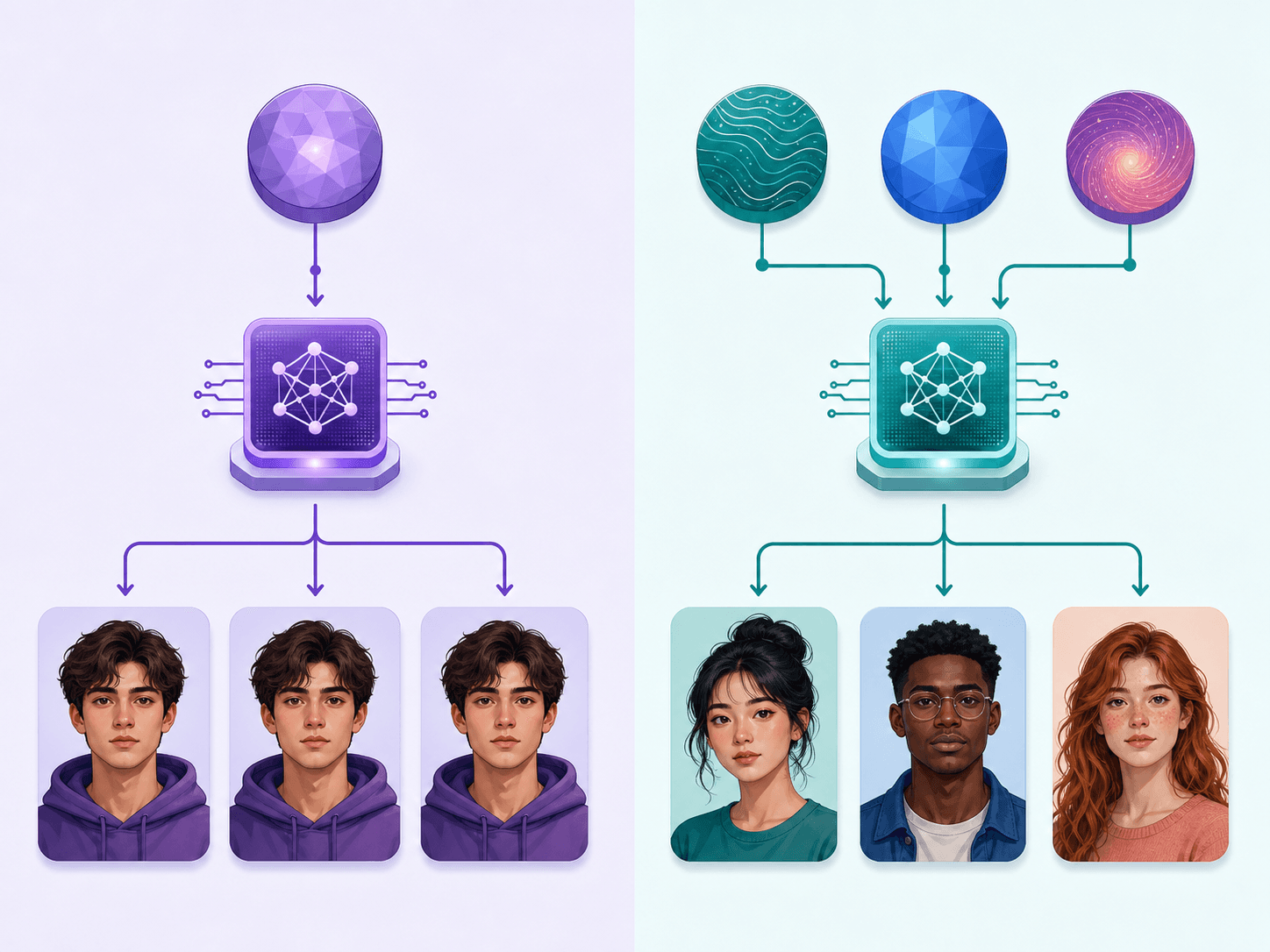
Fixed seed vs random seed: when to use each
A fixed seed is one number you type into the seed field yourself and reuse; a random seed is one the tool picks fresh on every run (many interfaces treat −1 or 0 in the seed field as "pick at random"). The practical difference: a random seed buys variety, a fixed seed buys control. Here are the 4 usual situations and the right choice for each:
- Random seed — the default; every generation explores a new composition, best when you want variety and options to choose from.
- Fixed seed — reuse one number to iterate on a prompt while keeping the same overall image, so you can tweak wording and see only that change.
- Reproduce a result — paste the seed from an image you liked (most tools show it in the metadata) to regenerate it exactly or hand it to someone else.
- A/B a single variable — hold the seed constant and change only the sampler, CFG or one prompt word to isolate that setting's true effect.
How the seed interacts with the prompt, sampler and CFG
The seed is one link in a chain of controls and only behaves cleanly when the rest are fixed. The /glossary/prompt decides what the image contains; the seed decides which of the countless valid images matching that prompt you actually get. The /glossary/sampler and its step count solve the denoising path, and /glossary/cfg sets how hard the prompt pulls on it — change any of those and the same seed produces a different picture, because the starting noise is now processed differently. One caveat: ancestral samplers such as "Euler a" inject fresh noise on every step, so they keep drifting even with a locked seed, which is why a fixed seed is most reliable with non-ancestral samplers like DDIM or DPM++ 2M.
| What you change at the same seed | What happens to the image | Why |
|---|---|---|
| Nothing | Identical, pixel for pixel | Same starting noise, same denoising path |
| The seed only | A completely different composition | Different starting noise for the same prompt |
| One word of the prompt | Different, but close in meaning | The direction the sampler pulls the noise changes |
| Step count or CFG | Different | The denoising path changes, not its starting point |
| Sampler set to Euler a | Keeps drifting between runs | Ancestral samplers inject fresh noise at every step |
| CPU instead of GPU | May not match | Hugging Face Diffusers: results may not be reproducible between CPU and GPU even with identical seeds |
| PyTorch version or platform | May not match | Full reproducibility is not guaranteed across releases, commits or platforms |
Why did the same seed give a different image?
This is the most common seed question, and the answer is almost never the seed itself. A seed only reproduces an image together with the whole environment around it, so a mismatch always means something in that environment differs. Check these 5 causes in order: (1) the prompt or negative prompt differs by even a space or a capital letter; (2) the model version or the attached /glossary/lora differs; (3) the sampler, step count, CFG or resolution differ; (4) you are on an ancestral sampler such as Euler a or DPM++ 2S a, which injects fresh noise at every step and will not repeat even at a locked seed; (5) the generation ran on different hardware or a different library version. That last one cannot be fixed with settings: the Hugging Face Diffusers docs state plainly that results may not be reproducible between CPU and GPU executions even when using identical seeds, and that completely reproducible results are not guaranteed across PyTorch releases, individual commits or platforms. That is why a seed copied from someone else's post often will not reproduce their picture on your machine — expected behaviour, not a bug.
How Twin AI handles seeds
Twin AI is built so you get variety without ever thinking about seed numbers. When you generate in /create/photo or /use-cases/image-generator, each image uses a fresh seed, so a batch gives you genuinely different options rather than near-duplicates. Its /photoshoots templates are tuned end to end, and because Twin runs several image models you can compare their output on the same prompt — for example in /compare/midjourney-vs-flux — to see how each interprets it. Your personal /glossary/lora-style model plugs into the same pipeline. Everything is payable with a Russian card or SBP, with no VPN required. Start free in /create/photo.
Sources
- Hugging Face Diffusers — Reproducible pipelines (seeds and determinism)huggingface.co
- Wikipedia — Random seeden.wikipedia.org
FAQ
What is a seed in Stable Diffusion?
A seed is the number that sets the initial random noise the model denoises into an image. With the same prompt, model and settings, the same seed always produces the same image, and a different seed produces a different one — so it is the control that makes results reproducible.
Does the same seed always give the same image?
Yes, as long as the prompt, model, sampler, step count, CFG scale and other settings are identical and the run happens on the same hardware and library version. Change any one of them — even a single word of the prompt — and the same seed produces a different image. One separate case: the Hugging Face Diffusers docs warn that results may not be reproducible between CPU and GPU executions even with identical seeds, and that full reproducibility is not guaranteed across PyTorch releases or platforms.
What is the difference between a fixed and a random seed?
A random seed picks a new starting point every time, giving you varied compositions. A fixed seed reuses one number so you can reproduce an exact image or iterate on a prompt while keeping the same overall picture and changing just one variable.
How do I reproduce an AI image I already made?
Copy its seed — most tools store the seed in the image metadata or generation info — and reuse it with the identical prompt, model and settings. That regenerates the same picture, or lets you share the recipe with someone else.
Do I need to set a seed in Twin AI?
No. Twin AI assigns a fresh seed to each generation automatically, so every image in a batch is a distinct option. Just type a prompt or upload photos in /create/photo — there is no seed field to manage.