
Stable Diffusion — Definition, How It Works & Versions
Updated 10 August 2026 · Twin AI Labs
Stable Diffusion is an open-source text-to-image AI model that turns a text prompt into a picture by starting from random noise and denoising it step by step inside a compressed latent space. Released by Stability AI in August 2022 with open weights, it is the model that put high-quality AI image generation on consumer GPUs and spawned tools like /glossary/lora, /glossary/controlnet and /glossary/ip-adapter.

What is Stable Diffusion?
Stable Diffusion is a deep-learning, text-to-image model: you type a text /glossary/prompt and it generates a matching image. It is a /glossary/diffusion model, meaning it learns to reverse a noising process — starting from pure random noise and gradually removing it until a coherent picture appears. What set it apart at launch was that its weights were released publicly under a permissive licence, so anyone could download and run it. It was created by researchers at the CompVis group at LMU Munich together with Runway, and funded and released by Stability AI in August 2022, building on the 2022 paper "High-Resolution Image Synthesis with Latent Diffusion Models" (arxiv.org/abs/2112.10752).
How Stable Diffusion works
The key trick is that Stable Diffusion is a latent diffusion model: instead of denoising millions of pixels directly, it works in a small compressed "latent" space. A variational autoencoder (VAE) squeezes a 512×512 image down to a 64×64 latent grid — roughly 48× fewer numbers — so the heavy denoising runs cheaply enough to fit on a consumer graphics card. A CLIP text encoder turns your prompt into numbers that guide the process, a U-Net /glossary/sampler removes the noise over a series of steps, and finally the VAE decoder expands the cleaned latent back into a full-resolution image.
Three components do the work together, and knowing them explains most settings you will meet:
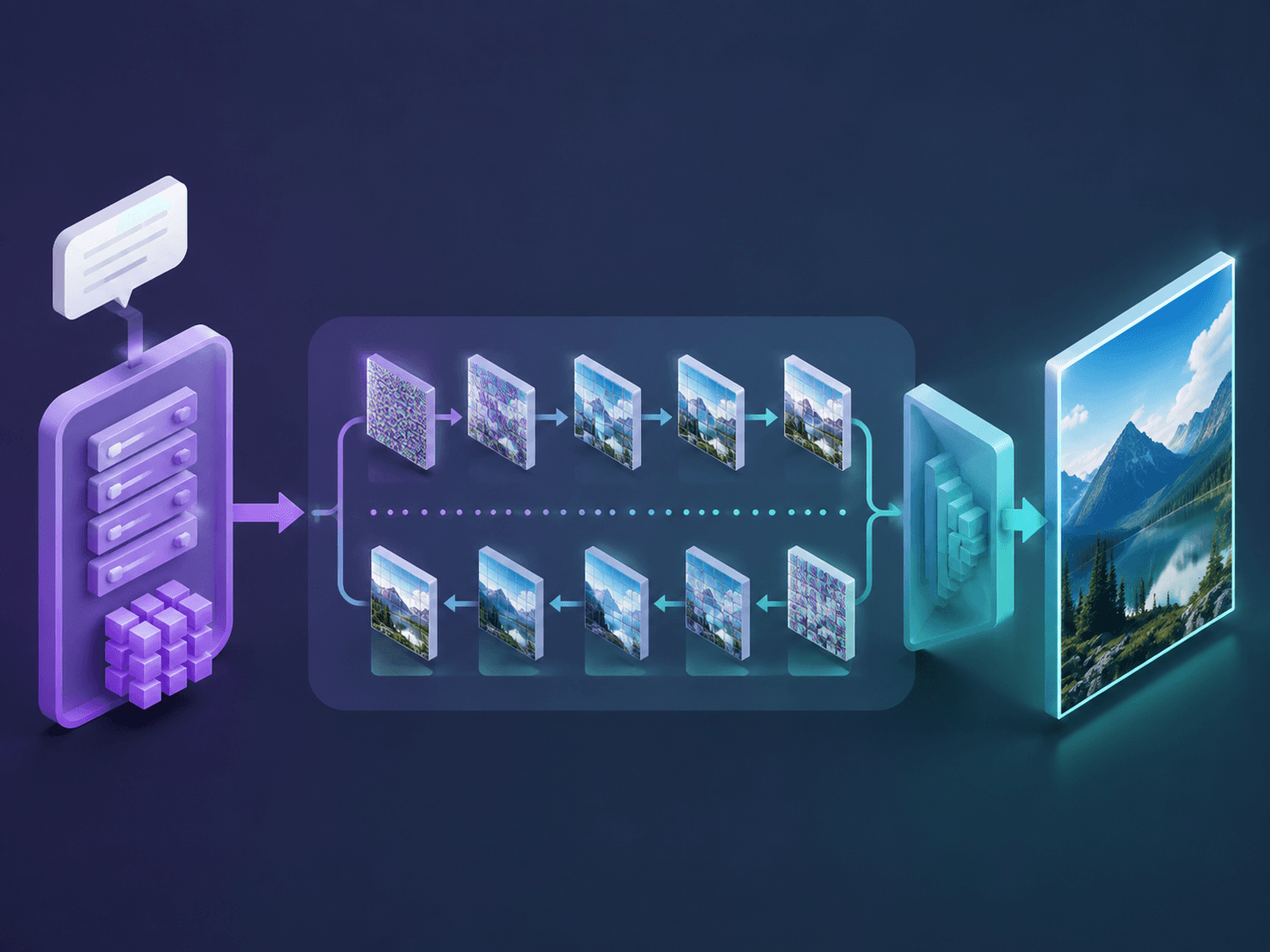
- Text encoder (CLIP) — converts your /glossary/prompt into an embedding the model can condition on.
- U-Net denoiser — the network that predicts and removes noise at each step, steered by /glossary/cfg guidance.
- VAE — compresses images into the latent space for training and generation, then decodes the result back to pixels.
Stable Diffusion versions
Stable Diffusion is a family, not a single model, and each generation raised resolution and prompt-following. Knowing the versions helps you read what a tool actually runs:
- SD 1.4 / 1.5 (2022) — the original 512×512 models; 1.5 became the most fine-tuned base and still anchors a huge ecosystem.
- SD 2.0 / 2.1 (late 2022) — a new OpenCLIP text encoder and native 768×768 output.
- SDXL (2023) — a much larger two-stage model with 1024×1024 output and far better composition and text.
- SD 3 / SD 3.5 (2024) — a rectified-flow transformer architecture (MMDiT) with stronger prompt adherence and typography.
Why Stable Diffusion matters: the open ecosystem
Because the weights are open, Stable Diffusion became a platform rather than a product. Anyone can fine-tune it, and the customisation techniques in this glossary were mostly built on top of it: a /glossary/lora teaches it a new face or style in a tiny adapter, /glossary/controlnet adds pose and structure control, and /glossary/ip-adapter lets a reference image act as a prompt. Interfaces like AUTOMATIC1111 and ComfyUI, plus community model hubs, grew around it. This openness is also why Stable Diffusion is the usual point of comparison for closed models — see /alternatives/stable-diffusion and /compare/midjourney-vs-flux.
How Twin AI relates to Stable Diffusion
Running Stable Diffusion well yourself means a capable GPU and wrangling samplers, VAEs, LoRAs and negative prompts. Twin AI removes that: it runs modern image models — the SD family alongside FLUX, Nano Banana and GPT Image — behind one interface, auto-tuning the /glossary/sampler, steps and /glossary/cfg for each. You upload a few photos and it keeps your face and style across a whole shoot, powering /use-cases/ai-photoshoot and /use-cases/avatar, and you can run the same prompt across models in /compare/midjourney-vs-flux. Everything is payable with a Russian card or SBP, no VPN required. Start free in /create/photo.
FAQ
What is Stable Diffusion?
Stable Diffusion is an open-source text-to-image AI model that generates images from a text prompt by denoising random noise step by step inside a compressed latent space. Released by Stability AI in August 2022 with open weights, it made high-quality AI image generation runnable on consumer GPUs.
How does Stable Diffusion work?
A CLIP text encoder turns your prompt into an embedding, a U-Net denoises a random latent over several steps guided by that embedding, and a VAE decoder expands the cleaned 64×64 latent back into a full-resolution image. Working in latent space instead of raw pixels is what makes it fast enough for a single graphics card.
Is Stable Diffusion free?
The model weights are open and free to download and run if you have the hardware and technical setup. Hosted services that run it for you — including Twin AI — charge for the compute, but Twin AI lets you start generating for free without installing anything.
What is the difference between Stable Diffusion and Midjourney?
Stable Diffusion is open-source, self-hostable and endlessly customisable with LoRAs, ControlNet and IP-Adapter, while Midjourney is a closed, hosted model tuned for polished aesthetics out of the box. Stable Diffusion gives more control; Midjourney gives more convenience.
Do I need Stable Diffusion to use Twin AI?
No. Twin AI runs modern image models — GPT Image 2.5, GPT Image 2, Nano Banana, Seedream (Stable Diffusion itself is not in Twin AI) — for you behind one interface and auto-tunes the sampler, steps and CFG, so you get results without installing Stable Diffusion or managing GPUs yourself. Just upload photos in /create/photo.